
How does AI image generation work?
Many generative AI tools now include the ability to create brand-new images based on a text prompt. Some tools even allow you to work with original images that you can then prompt to be edited or added to with AI.
The first thing to understand is that the new image created is not a collage of pre-existing images, it is a new image that has never been created before. But how does it work?
In a lot of instances, including Microsoft’s Co-pilot, the model used for creating images is DALL-E 3 (from Open AI). First DALL-E 3 was given a dataset of images and importantly their associated text captions, these sets are either from scraping images directly off the internet or by using curated datasets like LAION-5B, these data sets are typically very large for example LAION-5B has around 5.85 billion image–text pairs.
Nearly all the models use a diffusion technique to learn how to create new images, the model (DALL-E 3) adds ‘noise’ to all the images in the dataset and then attempts to reverse that process, back to the original image, the model then checks to see how well it has done. This training often takes months and requires a lot of computing power.
Once the training is complete the model can then use that noise to create new images.
Here is an example of the stages used in this instance by Stable Diffusion (this one was trained on a subset of the LAION-5B database.) to create a new image from noise.
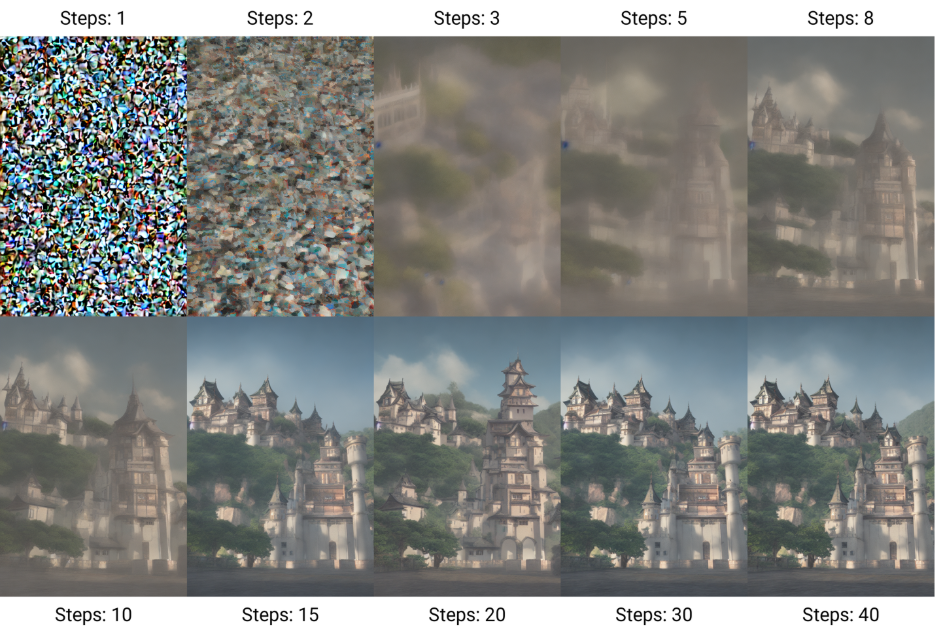
By Benlisquare – Own work, CC BY-SA 4.0, https://commons.wikimedia.org/w/index.php?curid=124800742
So, with this information to hand you may want to use this type of image making to enhance a document or a presentation. Adding images can really help to not only make your work more visually appealing and to create specific images for your content but is proven to help improve retention of your message and content within education.
Considerations
There are ongoing concerns from designers, artists and photographers including legal challenges of AI-generated images and issues related to the use of copyrighted materials to train AI models. Primarily these issues focus on whether there was unauthorized data collection, whether the collection was a copyright infringement and whether the training of AI on copyrighted material is acceptable under a ‘fair use’ argument.
The AI-generated images that are output are dependent on their models’ training and so this means that you may find images can have various biases, for example, if one model was only trained with images of cities in the northern hemisphere, when asking it to create cities of Africa it would be wildly wrong or create clearly cliched images. If you ask AI to generate an image of a wristwatch for example the time will often be set to 10:10, most commercial images of watches are set to 10:10, so this time becomes statistically overrepresented in the training data.
Trying different tools with different training sets and the same prompts will provide very different results.
Here are two images from one prompt only using two different tools: Create a photorealistic image in the style of Brian Skerry of a large humpback whale with an emphasis on biodiversity, and themes of protecting the planet
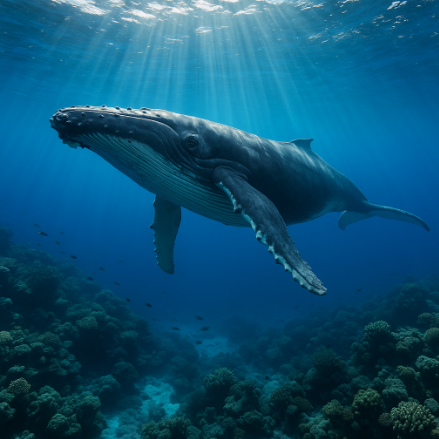
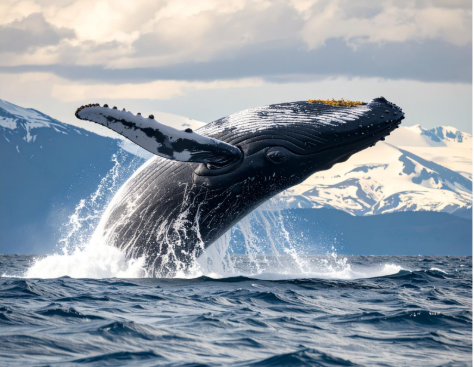
(Image one Perplexity Labs, Image two Adobe Firefly)
Bite-sized task
Step 1 – learn
Watch this two-min chapter on LinkedIn Learning to get some tips on how to write good image generation prompts, writing a good prompt is key to gaining as much control over the output as possible.
Step 2 – do
Now using Microsoft Co-pilot, find some current learning materials, for example, a presentation, and see where you could replace text with an image to help illustrate your main points. Don’t forget you can ask for improvements and edits with follow-up prompts to Copilot.
Step 3 – reflect
Has the use of images in your presentation enhanced content and presentation? How might you evaluate the effectiveness of these changes to your presentation for your students?
Join the conversation
Post your thoughts on the weekly Teams post to join the conversation.
Further links
Ethical Pros and Cons of AI Image Generation – IEEE computing society
The LAION 5b dataset https://laion.ai/blog/laion-5b/
For a deep dive: Simon Willison writes insightful pieces on using AI, LLMs with a high level of technical detail.
Contributor biography
Dr. Adam Procter is a Principal Teaching Fellow of Games and Interaction Design at Winchester School of Art, University of Southampton. He leads the BA (Hons) Games Design & Art programme within the Department of Art and Media Technology. He recently worked with two post graduate researchers from the Creative Computing Institute firstly to review the AI image generation landscape as it emerged and then he created a series of workshops using AI image generation techniques and built and tested some bespoke AI image tools using small, curated data sets with Dr Christina Mamakos and Winchester School of Art, Fine Art Painting Students.
© 2025. This work is openly licensed via CC BY-NC-SA