

What is Copilot, and why use it?
Copilot is a generative AI chat tool from Microsoft that is available to University of Southampton staff and students through the Microsoft Office 365 environment. Like other Large Language Models (LLMs), it generates text, summaries and suggestions (and more) in response to your prompts. UoS offers the web-based version because it has Enterprise Data Protection. Using Copilot with your University Microsoft account gives you enhanced data protection, Microsoft cannot see your chats, and your input is not used to train the AI. This makes it more secure than free tools like ChatGPT or Gemini. While newer models are faster and offer more features, Copilot is a safe and reliable place to start. Once you feel confident using it and understand its data protection implications, you might explore other AI tools to better understand your students’ use.
Beyond data protection
Generative AI can be a helpful tool, but it has some important caveats. There are ongoing debates about who owns the material you put in and what comes out, and concerns have been raised about environmental impact and built-in bias, amongst other things. It can also produce “hallucinations” (convincing but incorrect information) so checking, reviewing, and editing everything you get back is important. Think of it as a support tool, not a replacement for your expertise.
Efficiency and augmentation
Generative AI tools support your work in two ways: improving efficiency by handling repetitive tasks (like drafting polite emails, writing short reports, or calculating basic statistics); and augmenting your work (by helping you spark ideas, reflect, structure complex projects, or explore inclusive and innovative teaching approaches). This frees you to focus on higher-level thinking and creativity.
Prompting and writing prompts (instructions): PREP and EDIT
Generative AI works best when treated as a conversation partner. Microsoft researchers suggest shifting from “command mode” to “conversation mode”: “If you want to get a better answer, you have to know how to ask a better question.”
One useful prompting framework is the PREP/EDIT framework (Dan Fitzpatrick, 2023) to help structure this dialogue. It encourages you to start with a clear goal, respond to clarifying questions, and refine your prompt based on what Copilot gives back, turning prompting into a two-way conversation. It also encourages you to check the accuracy of AI outputs.
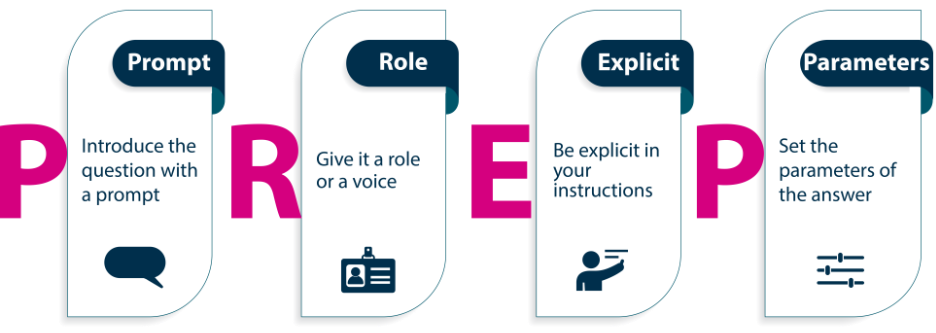
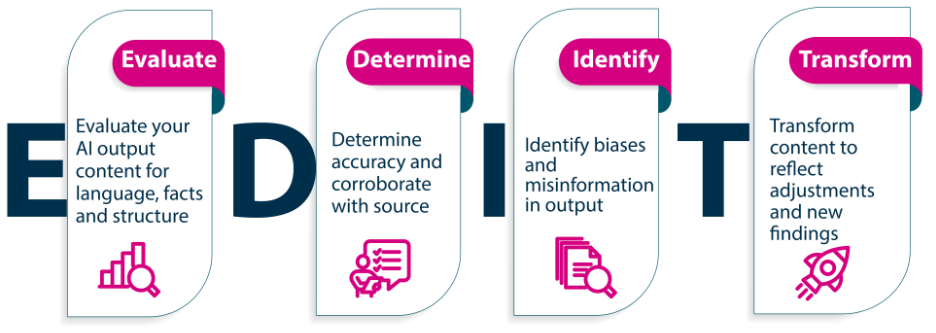
The AI Classroom: The Ultimate Guide to Artificial Intelligence in Education PREP p.91 and EDIT p.100
Tips for effective prompting:
- Use clear, specific language
- Follow up and add context
- Evaluate, check and refine the output
Copilot can support many tasks, such as brainstorming ideas, explaining difficult concepts, summarising or organising notes, planning and structuring your writing, improving grammar and spelling, translating between languages, overcoming writer’s block, debugging code, and organising your schedule.
Bite-sized task
This activity is designed for those new to generative AI and to give you a feel for Copilot’s capabilities and limitations. Set aside 15–20 minutes with a laptop or phone and an optional cup of tea or coffee!
Step 1 – learn
- Sign in by visiting M365 Copilot and selecting “Sign in”. Use your University of Southampton username (abc1g23@soton.ac.uk) and password. Once logged in, you should see UoS branding near the top. Signing in ensures that Microsoft’s data protection commitments cover your prompts and responses.
- Read the Digital Learning team’s information on prompt writing.
- Read the UoS guidance from the Generative AI Working Group SharePoint page, which has useful information on using generative AI in education practice.
Step 2 – do
Choose from the sample prompts below to explore efficiency and augmentation when using Copilot. Feel free to adapt them to your context and resources, but remember to give Copilot a clear role, define the task, and include any specific instructions. Once you have an initial response, continue to work with Copilot to develop the output, bearing in mind the PREP/EDIT framework.
Efficiency tasks
- As a university lecturer, draft a professional yet warm email reminding a group of diverse students of the upcoming coursework deadline for [Module Name], including a Blackboard link and a short motivational note. [you will need to embed the links after]
- Summarise the key decisions and action points from this Teams meeting, focusing on curriculum planning and staff responsibilities. Provide a bullet-point list. [Download a Teams meeting transcript and upload to Copilot]
- You are leading a 45-minute meeting with programme leaders about assessment redesign. Create a structured agenda that includes time allocations, discussion items, and desired outcomes.
- Create a PowerPoint based on these lecture notes.
- Reformat this rough teaching guide into a well-structured, accessible Word document using headers, bullet points, and academic formatting suitable for distribution on Blackboard.
- Create a comparative table listing at least five research methods used in X, including their key features, strengths, and limitations.
- Write a professional yet friendly and compassionate response to a student’s query about late submission due to illness. Outline that they need to do [include information]
- Create a weekly to-do list for a lecturer preparing for the start of term, based on standard academic prep tasks (updating VLE, scheduling office hours, assessment checks).
Augmentation tasks
Think of tasks you will do when developing your practice. Try out the below ideas by modifying the prompts to reflect your own areas.
- Look at these notes [add notes]. Generate constructive and personalised formative feedback for students who achieved a 62% on their essay. Focus on the critical thinking, paragraph structure, and engagement with literature that I have mentioned and create reflective questions to support the student in developing these skills.
- Suggest three inclusive, low-barrier icebreakers for a first-year lecture with 150 students. Include one option suitable for remote participants.
- Rewrite the following learning outcome using Bloom’s Taxonomy at the “evaluate” level. Ensure it is measurable and aligned with HE assessment standards.
- Provide a critical commentary on this conference abstract, focusing on how well it communicates the research question, methodology, and potential contribution to the field.
- Create a marking rubric for a group presentation in a social science module. Include 4–5 criteria, each with descriptors for distinction, merit, pass, and fail. [Upload relevant documents from the module.]
- Suggest three inclusive learning strategies appropriate for large-group teaching of quantitative methods to non-specialist social science undergraduates.
- Write a classroom-based role-play scenario on X. Include a follow-up discussion question for the group.
- Generate five seminar discussion questions on X.
- Write a short case study describing a dilemma faced by a marketing professional in a diverse team. Embed themes of ethics, identity, and inclusion.
- Draft a short syllabus welcome message for students from diverse backgrounds in a computer science module. It should communicate belonging, expectations, and support.
- Simulate three questions that students might ask in a lecture on AI bias, and provide clear, confident answers a lecturer could use in real time.
- Write five multiple-choice questions (and correct answers with explanations) for a first-year module quiz on global public health challenges.
- Simplify this seminar preparation guide to suit students with English as an additional language. Replace jargon with plain language and include examples.
- Write three reflective prompts for students to evaluate their contributions to a group project and what they learned about collaboration and communication.
- Design a three-stage scaffolded task to help second-year students write a critical literature review on a chosen topic in sociology.
- Suggest three activities for a co-creation project where students help design assessment criteria for their group projects. Include potential risks and benefits.
- Create a visual concept map (for PowerPoint) showing the interconnections between sustainability, environmental justice, and global policy frameworks.
Step 3 – reflect
After experimenting, consider these questions:
- How accurate and useful were Copilot’s outputs?
- Compare the efficiency tasks with the augmentation tasks. Which ones saved you time and helped you think differently about your teaching?
- Did Copilot’s tone and content align with your intended audience? What did you do to adapt it and why? What edits did you need to make to ensure clarity, inclusivity or disciplinary accuracy?
- Where might Copilot slot naturally into your teaching workflow, and where would you still rely on your own expertise?
Join the conversation
Post your thoughts on the weekly Teams post to join the conversation.
Further links
Digital Learning Prompt-a-thon
UoS Microsoft Copilot Chat advice
Self-assess your AI and Generative AI capabilities
Contributor biography
Vanessa Mar-Molinero is a Senior Teaching Fellow in Academic Practice at the Centre for Higher Education Practice (CHEP) in the Faculty of Social Sciences. A Senior Fellow of AdvanceHE, she specialises in inclusive education, learner autonomy, digital literacies, and relational pedagogies. With an academic background in Modern Languages, Cultural Studies and Transnationalism, her work explores how belonging, mattering, critical theory and cultural theory inform inclusive learning in higher education.
© 2025. This work is openly licensed via CC BY-NC-SA